Python 连接列表意味着连接一个列表的字符串与一个指定的分界符来形成一个字符串. 有时,当你需要将列表转换为字符串时,它是有用的。
Python 加入名单
我们可以使用 python string join() 函数来加入一个字符串列表. 这个函数将 iterable’ 作为论点,而 List 是可互操作的,所以我们可以使用它与 List。 此外,列表应该包含字符串,如果你要尝试加入一个字符串列表,那么你会收到一个错误消息,如 TypeError: sequence item 0: expected str instance, int found`. 让我们来看看一个简短的例子,以便在 python 中加入列表来创建一个字符串。
1vowels = ["a", "e", "i", "o", "u"]
2
3vowelsCSV = ",".join(vowels)
4
5print("Vowels are = ", vowelsCSV)
当我们运行上述程序时,它将产生以下输出。
1Vowels are = a,e,i,o,u
Python 连接两个字符串
我们也可以使用 join() 函数来连接两个字符串。
1message = "Hello ".join("World")
2
3print(message) #prints 'Hello World'
为什么 join() 函数在 String 中而不是列表中?
许多 Python 开发人员提出的一个问题是,为什么 join() 函数是 String 的一部分,而不是列表。
1vowelsCSV = vowels.join(",")
周围有一个受欢迎的StackOverflow问题(https://stackoverflow.com/questions/493819/python-join-why-is-it-string-joinlist-instead-of-list-joinstring),在这里我列出了对我来说完全有意义的讨论中最重要的点。
主要原因是 join() 函数可以与任何 iterable一起使用,结果总是是一个 String,所以在 String API 中具有这个函数,而不是在所有可迭代类中拥有它。
连接多个数据类型的列表
让我们看看一个程序,我们将尝试加入具有多个数据类型的列表项目。
1names = ['Java', 'Python', 1]
2delimiter = ','
3single_str = delimiter.join(names)
4print('String: {0}'.format(single_str))
Let's see the output for this program: 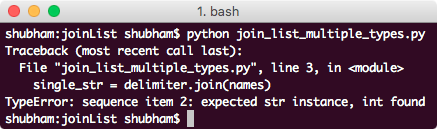 This was just a demonstration that a list which contains multiple data-types cannot be combined into a single String with
 join() function. List must contain only the String values.
分割字符串使用 join 函数
我们可以使用join()函数来分割一个字符串,并使用指定的分界器。
1names = 'Python'
2delimiter = ','
3single_str = delimiter.join(names)
4print('String: {0}'.format(single_str))
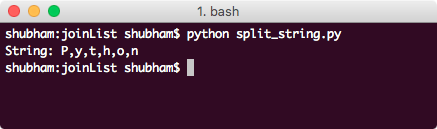 This shows that when String is passed as an argument to join() function, it splits it by character and with the specified delimiter.
使用 split() 函数
除了使用join()函数进行分割外,也可以使用split()函数来分割一个 String,这与join()函数几乎相同。
1names = ['Java', 'Python', 'Go']
2delimiter = ','
3single_str = delimiter.join(names)
4print('String: {0}'.format(single_str))
5
6split = single_str.split(delimiter)
7print('List: {0}'.format(split))
Let's see the output for this program: 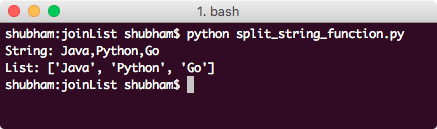 We used the same delimiter to split the String again to back to the original list.
只分割 n 次
我们在上一个示例中展示的split()函数也采用了可选的第二个参数,这意味着该 splot 操作应该执行多少次。
1names = ['Java', 'Python', 'Go']
2delimiter = ','
3single_str = delimiter.join(names)
4print('String: {0}'.format(single_str))
5
6split = single_str.split(delimiter, 1)
7print('List: {0}'.format(split))
Let's see the output for this program: 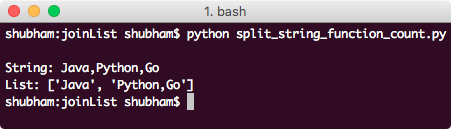 This time, split operation was performed only one time as we provided in the
 split() function parameter. That's all for joining a list to create a string in python and using split() function to get the original list again.