介绍
getBoundingClientRect,是JavaScript DOM(https://andsky.com/tech/tutorials/introduction-to-the-dom)(文档对象模型)的一部分,为您提供了有关HTML元素的大小和定位的重要数据。
在本文中,您将使用getBoundingClientRect来获取元素的大小和位置。
前提条件
要完成本教程,您应该熟悉以下概念:
- 如何在HTML中添加JavaSCript
- 如何在DOM中访问元素 *在JavaScript中使用对象,您可以通过阅读(https://andsky.com/tech/tutorials/understanding-objects-in-javascript)来探索。
理解getBoundingClientRect()
要使用getBoundingClientRect,请先检索一个HTML元素,然后在元素上调用getBoundingClientRect:
1document.getElementById("foo").getBoundingClientRect();
getBoundingClientRect 返回一个 object 带有多个 key/value 对,为您提供有关元素在网页中的大小和位置的信息。
 1[secondary_label Output]
 2{
 3  top: 450,
 4  left: 400,
 5  right: 825,
 6  bottom: 500,
 7  x: 400,
 8  y: 450,
 9  width: 425,
10  height: 50
11}
下图描述了每个值返回的信息:
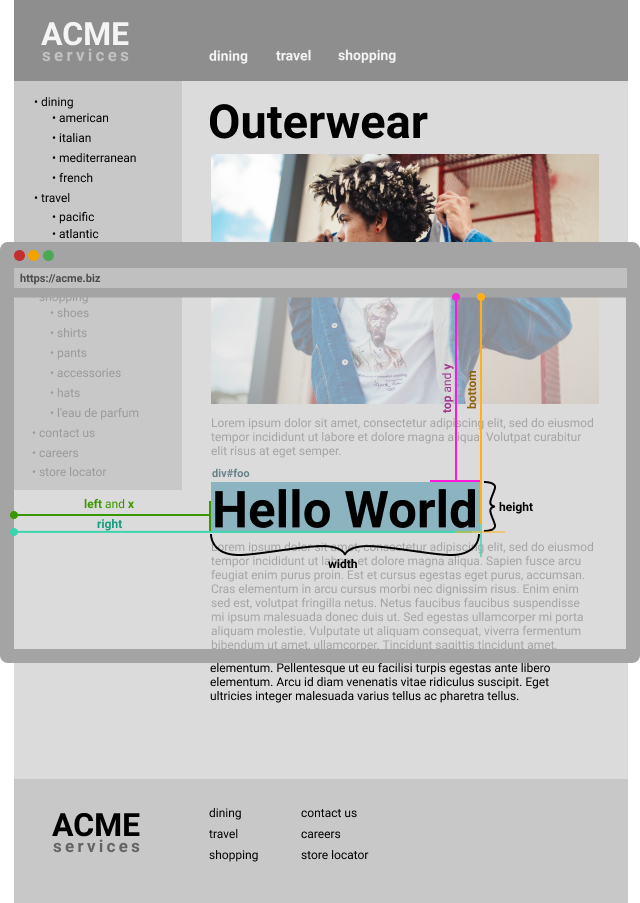
x和y值将相当于左和顶部值,因此,一些浏览器会忽略x和y,只返回左和顶部。
另一个值得注意的事情是,‘右’/‘底’可能与你在CSS定位中所习惯的不同,例如使用‘位置:绝对’定位时。
以下是一个示例,显示值以及它们如何与元素相关:
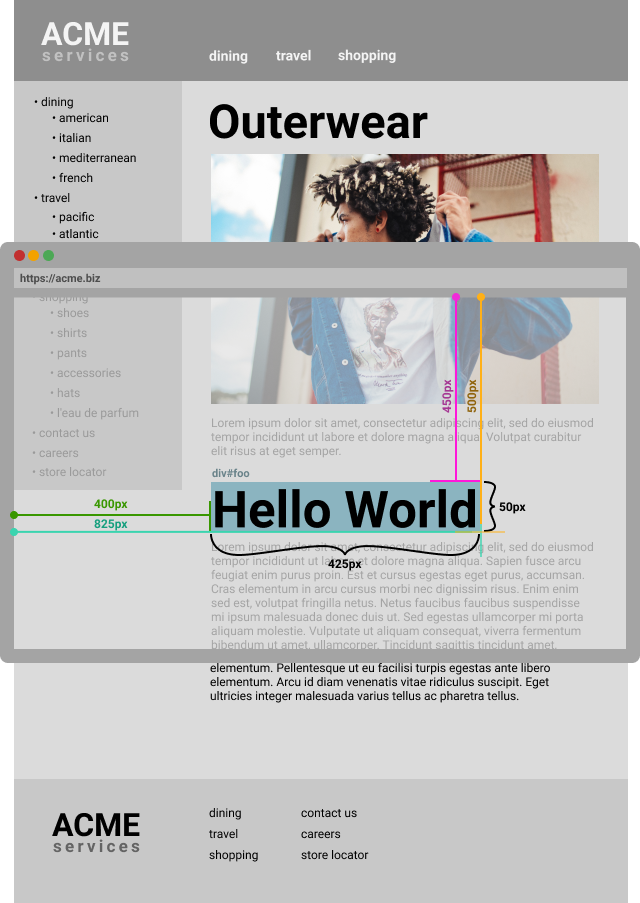
现在你已经看到getBoundingClientRect()返回了什么,使用相同的示例,看看你是否理解getBoundingClientRect()的输出。
在应用程序中使用getBoundingClientRect
要在自己的代码中使用getBoundingClientRect,您需要一个包含您要查询的元素的HTML文档。
在文本编辑器中创建一个名为boundingbox.html的新HTML文件:
1nano boundingbox.html`
在文件中,创建一个含有<div>标签的HTML文档,在<body>中使用hello的id
 1[label boundingbox.html]
 2<!DOCTYPE html>
 3<html>
 4  <head>
 5    <meta charset="utf-8">
 6    <title>useBoundingBox example</title>
 7  </head>
 8  <body>
 9    <div id="hello">Hello World</div>
10  </body>
11</html>
一旦你在页面上有一个元素,你可以在#foo元素上调用getBoundingClientRect。在关闭的<body>标签下,添加一个新的<script>标签。在<script>标签中,拿出hello的id元素,然后调用getBoundingClientRect()。打印结果到JavaScript控制台:
 1[label boundingbox.html]
 2<body>
 3  <div id="hello">Hello World</div>
 4
 5  <script>
 6  const helloElement = document.getElementById('hello');
 7  const results = helloElement.getBoundingClientRect();
 8  </script>
 9
10</body>
保存文件并在您的浏览器中加载boundingbox.html。
控制台显示此输出:
1[secondary_label Output]
2bottom: 27.199996948242188
3height: 19.199996948242188
4left: 8
5right: 1261
6top: 8
7width: 1253
8x: 8
9y: 8
来自#hello元素的输出显示了它在网页上的大小和位置,您可以使用此信息来定位与此元素相关的其他元素、动画元素等。
结论
在本文中,您看到getBoundingClientRect提供了大量关于元素位置的数据.由于getBoundingClientRect与视图端口相对,您可以将window.scrollY和window.scrollX值添加到顶部和左侧字段,以获得 HTML 元素的位置与整个网页相对。
它在所有桌面和移动浏览器上都可靠支持(https://caniuse.com/#feat=getboundingclientrect),除x和y值外,在 Internet Explorer/Edge 和 Safari 的旧版本中是不稳定的。
有关getBoundingClientRect的更详细信息,您可以从W3C的CSS对象模型(CSSOM)视图模块(https://drafts.csswg.org/cssom-view/#dom-element-getboundingclientrect)阅读官方规格。