NDoc是一个.NET代码文档生成工具,有点象JDoc,但这个是在.NET下的工具。
NDoc使用Visual Studio.NET开发过程中生成的程序集和XML文档来生成一些格式象Visual Studio.NET和.NET Frmaework SDK在线帮助文档那样的一些编译后的HTML帮助文档。
它是一个OpenSource的项目,在 http://ndoc.sourceforge.net 可以下载到SourceCode。
使用十分简单,例如创建一个简单的项目来看NDoc可以为我们做些什么?
创建一个简单项目叫testNDoc,只有一个WindowForm,上面有个Button,单击显示信息。
将显示信息的类封装为ShowMsg类,只有一个方法ShowMessage.
代码如下:
showMsg.cs
 using System; using System.Windows.Forms; namespace testNDoc
 {
{ ///
///
1<summary>
2 /// ShowMsg 的摘要说明。
3 /// 显示测试信息的类
4 /// </summary>
 public class ShowMsg { public ShowMsg() { // // TODO: 在此处添加构造函数逻辑 //
 } ///
} ///
1<summary>
2 /// 测试字符串
3 /// </summary>
private string testStr = null ; #region 显示信息在信息框中的公有函数 ///
1<summary>
2 /// 显示信息在信息框中的公有函数
3 /// </summary>
///
1<param name="msg"/>
传递字符串参数 public void ShowMessage( string msg) { MessageBox.Show(addStr(msg)); } #endregion ///
1<summary>
2 /// 增加几个字符的私有函数
3 /// </summary>
///
1<param name="msg"/>
传递字符串参数 ///
1<returns> 返回处理过的字符串 </returns>
protected string addStr( string msg) { // 返回字符串 return " StrAdd: " + msg; } ///
1<summary>
2 /// test addOk
3 /// </summary>
///
1<param name="msg"/>
///
1<returns></returns>
protected string addOk( string msg) { return " Ok: " + msg; } } }
}
Form1.cs
using System; using System.Drawing; using System.Collections; using System.ComponentModel; using System.Windows.Forms; using System.Data; namespace testNDoc { ///
1<summary>
2 /// Form1 的摘要说明。
3 /// </summary>
public class testNDoc : System.Windows.Forms.Form { private System.Windows.Forms.Button btnShowMsg; private System.Windows.Forms.Button btnNoSummary; ///
1<summary>
2 /// 必需的设计器变量。
3 /// </summary>
private System.ComponentModel.Container components = null ; public testNDoc() { // // Windows 窗体设计器支持所必需的 // InitializeComponent(); // // TODO: 在 InitializeComponent 调用后添加任何构造函数代码 // } ///
1<summary>
2 /// 清理所有正在使用的资源。
3 /// </summary>
protected override void Dispose( bool disposing ) { if ( disposing ) { if (components != null ) { components.Dispose(); } } base .Dispose( disposing ); } Windows 窗体设计器生成的代码 ///
1<summary>
2 /// 设计器支持所需的方法 - 不要使用代码编辑器修改
3 /// 此方法的内容。
4 /// </summary>
private void InitializeComponent() { this .btnShowMsg = new System.Windows.Forms.Button(); this .btnNoSummary = new System.Windows.Forms.Button(); this .SuspendLayout(); // // btnShowMsg // this .btnShowMsg.Location = new System.Drawing.Point( 72 , 104 ); this .btnShowMsg.Name = " btnShowMsg " ; this .btnShowMsg.Size = new System.Drawing.Size( 128 , 32 ); this .btnShowMsg.TabIndex = 0 ; this .btnShowMsg.Text = " ShowMsg " ; this .btnShowMsg.Click += new System.EventHandler( this .btnShowMsg_Click); // // btnNoSummary // this .btnNoSummary.Location = new System.Drawing.Point( 72 , 160 ); this .btnNoSummary.Name = " btnNoSummary " ; this .btnNoSummary.Size = new System.Drawing.Size( 128 , 32 ); this .btnNoSummary.TabIndex = 1 ; this .btnNoSummary.Text = " No Summary " ; this .btnNoSummary.Click += new System.EventHandler( this .btnNoSummary_Click); // // testNDoc // this .AutoScaleBaseSize = new System.Drawing.Size( 6 , 14 ); this .ClientSize = new System.Drawing.Size( 520 , 341 ); this .Controls.Add( this .btnNoSummary); this .Controls.Add( this .btnShowMsg); this .Name = " testNDoc " ; this .Text = " testNDoc " ; this .ResumeLayout( false ); } #endregion ///
1<summary>
2 /// 应用程序的主入口点。
3 /// </summary>
[STAThread] static void Main() { Application.Run( new testNDoc()); } ///
1<summary>
2 /// 单击button显示信息
3 /// </summary>
///
1<param name="sender"/>
///
1<param name="e"/>
private void btnShowMsg_Click( object sender, System.EventArgs e) { ShowMsg sMsg = new ShowMsg(); sMsg.ShowMessage( " Hello? " ); } private void btnNoSummary_Click( object sender, System.EventArgs e) { ShowMsg sMsg = new ShowMsg(); sMsg.ShowMessage( " No Summary Click! " ); } } }
为了使用NDoc生成文档,必须有一个编译后的程序集和一个导出的XML文件,要生成这个XML文件,必须在项目属性中将生成XML文件的
选项填上文件名字,如下图: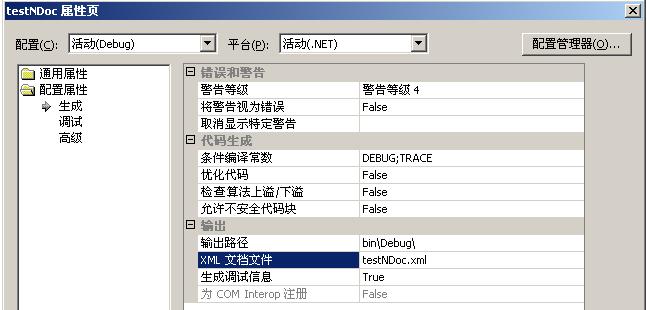
编译有生成一个对应的XML文件:
打开XML文件看到以下内容(注意:这个XML文件并不是NDoc生成的,而是Visual Studio.NET生成的):
< doc > < assembly > < name > testNDoc